Prompt Design · Chapter 8 · Lesson 2 · 5 min read
Testing your prompts
Testing is the part of prompt design that is easiest to skip and most expensive to skip. A prompt tested only on the input you had in mind when you wrote it is not a tested prompt; it is a prompt that worked once. Knowing whether it works reliably means deliberately trying to break it, and that requires a test suite.
A prompt that works on one input is not a prompt that works reliably. Reliability is demonstrated across a range of inputs, including ones you did not anticipate.
What a prompt test suite looks like
A test suite is a collection of inputs that together cover the range the prompt will encounter in real use. It does not need to be large: for most prompts, ten to twenty inputs catch the majority of reliability problems.
A useful suite has three kinds of inputs.
Typical cases represent the most common scenario the prompt will handle. For a prompt that classifies customer feedback, these are straightforward examples of each category. They confirm the prompt handles the normal case correctly.
Edge cases sit at the boundary of what the prompt was designed for: unusually short or long inputs, a different register or language, inputs ambiguous about their category. They reveal where the prompt’s assumptions break down.
Adversarial cases are designed to trigger failure modes you can anticipate. For a prompt that extracts structured data, an adversarial case might contain the field names you extract but with misleading values. For a sentiment classifier, it might be a review that expresses mixed sentiment in an unusual way. They reveal whether the prompt handles realistic difficult inputs, not just easy ones.
The iteration loop
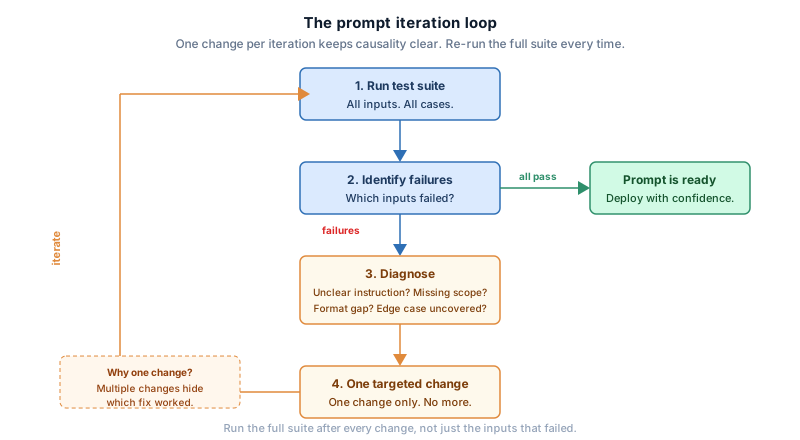
Testing without a process for the results is just running prompts. The value comes from the loop: test, diagnose, fix, test again.
1. Run the prompt on every input in the test suite.
2. Identify which inputs produced failures or unexpected outputs.
3. Diagnose the cause: is the instruction unclear? Is the format underspecified?
   Is there a missing scope constraint? Is an edge case not covered by the examples?
4. Make one targeted change to the prompt.
5. Re-run the full test suite.
6. Verify the fix resolved the failure without breaking inputs that previously passed.
Making one change at a time matters. Change several things at once and you cannot tell which caused an improvement, or which caused a regression. One change per iteration keeps causality clear.
Evaluating outputs
For structured output, evaluation is straightforward: the output either matches the expected schema or it does not. For prose, it is harder, because there is no single correct answer.
A practical approach for prose is to define a small set of criteria the output must satisfy, rather than comparing it to a reference answer. For a summarisation prompt: does the summary cover the main point, is it within the length limit, does it avoid the excluded content types? Checking explicit criteria is more reliable than judging whether the output “seems good.”
For high-stakes applications, having a second model evaluate the output against the criteria scales without the inconsistency of human judgment on large test suites.
Knowing when a prompt is good enough
There is no perfect prompt, and a point comes where further optimization yields diminishing returns. A practical stopping criterion: the prompt passes all typical cases, passes the edge cases you know about, and fails only on adversarial inputs that are genuinely unlikely in real use.
For a low-stakes application, a smaller suite and looser criterion are fine. For a pipeline where failures have downstream consequences, a more thorough suite and stricter criteria are warranted. The right level of testing is proportional to the cost of failure.
Prompts change when models change
A prompt that works reliably with one model version may behave differently after a model update. Providers update their models periodically, and those updates can shift behavior in ways that affect well-tuned prompts. A test suite helps here too: running it against a new model version quickly reveals whether existing prompts need adjustment.
This is not a reason to avoid building reliable prompts. It is a reason to keep your test suite around after you finish building, and to run it again when the environment changes.
This is the final lesson of the course. The skills across these eight chapters, from prompt anatomy to output format to systematic testing, are not independent techniques; they compose. A prompt with a clear instruction, a well-chosen role, good examples, a precise output format, and a test suite behind it is one you can keep reliable as things change.