Prompt Design · Chapter 7 · Lesson 1 · 5 min read
Controlling output format
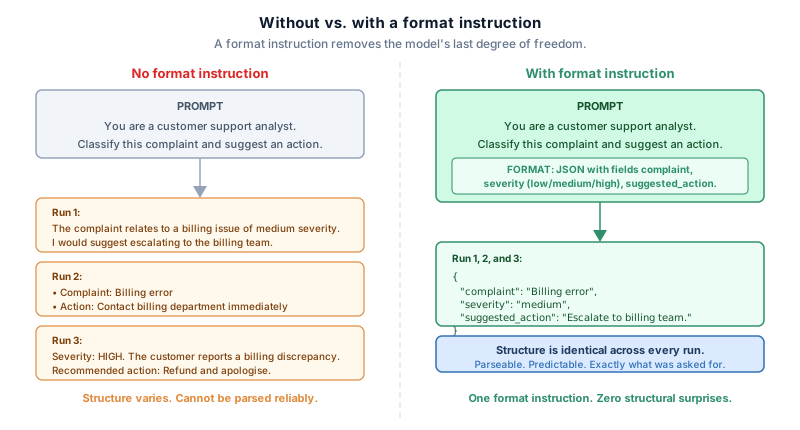
A well-designed prompt has a role, an instruction, context, and examples. One degree of freedom remains: the structure of the response. Without a format instruction, the model organizes its output however seems natural given the rest of the prompt. That choice is usually reasonable, and rarely exactly what you wanted.
Controlling output format closes the last of the gap between what you asked for and what you get.
Specifying output format removes the model’s last degree of freedom. It is the difference between output that looks approximately right and output that is exactly right.
What output format controls
A format instruction can specify any or all of the following:
- Structure: a numbered list, a table, a JSON object, continuous prose, bullet points
- Length: a single sentence, three bullet points, under 200 words, exactly one paragraph
- Field names: when the output has labeled sections, what those labels should be called
- Order: which information appears first, which appears last
- Exclusions: what the output should not contain
The model decides each of these on its own if you do not specify it, and each unspecified decision is a place the output can diverge from what you needed.
Format instructions in plain language
For most tasks, a plain-language format instruction placed at the end of the prompt is enough.
Summarise the following article in three bullet points.
Each bullet must be a single sentence.
Do not include statistics or numbers.
This specifies structure (bullet points), length (three, one sentence each), and exclusion (no numbers). The model has little room to produce something structurally wrong.
Put the format instruction last, as the placement principle from Chapter 1 says. It benefits from recency and is harder to ignore than the same instruction buried in the middle of a long prompt.
Schemas for structured output
When the output will be consumed by code rather than read by a person, plain-language instructions are not precise enough. A model told to “return a JSON object” might return valid JSON with different field names than your code expects, extra fields, or values your parser cannot handle.
For programmatic use, provide a schema: an explicit definition of every field, its name, and its expected type.
Return your response as a JSON object with exactly these fields:

{
  "complaint": string,       // the main complaint, one sentence
  "severity": "low" | "medium" | "high",
  "suggested_action": string // one sentence
}

Do not include any fields other than these three.
Do not include explanation or prose outside the JSON object.
The schema leaves nothing to interpretation: exact field names, constrained value types. The instruction to exclude everything outside the object closes the most common failure mode, where the model wraps the JSON in an explanation.
JSON mode and structured output APIs
Many model APIs offer a JSON mode or structured output feature that enforces format at the API level rather than relying on the prompt. When enabled, the model is constrained to produce valid JSON, and in some implementations to match a schema you provide.
This is more reliable than a prompt instruction, because the constraint is enforced mechanically rather than by the model’s interpretation. In a pipeline where a format error would cause a downstream failure, use the API-level feature if it is available; a prompt instruction is the fallback.
Length control
Length is easy to underspecify. “Be concise” is subjective, and the model’s sense of concise may not match yours. Quantitative constraints are more reliable:
Instead of: Be concise.
Write:      Keep the response under 100 words.

Instead of: Give a brief summary.
Write:      Summarise in exactly three sentences.
The quantitative version gives a concrete target. The subjective version leaves the model to calibrate against its own sense of brief, which varies.
One caveat: very tight constraints sometimes cause the model to truncate content abruptly rather than restructure it to fit. If output is cut off in a way that drops important information, the constraint may be too tight for the content the prompt asks for. Loosening it slightly, or telling the model what to prioritize if it must cut, usually works better than tightening further.
Combining format with the rest of the prompt
A complete prompt now has all five slots filled deliberately:
[Role]        You are a customer support analyst.
[Instruction] Classify the following complaint and suggest an action.
[Context]     The complaint comes from a premium subscriber.
[Examples]    (one or two worked examples)
[Format]      Return a JSON object with fields: complaint, severity, suggested_action.
              Severity must be "low", "medium", or "high".
              Do not include any text outside the JSON object.
Each slot does one job: the format slot does not describe the task, the instruction slot does not describe the format. When each slot owns exactly one thing, debugging a bad output is straightforward, because you know which slot to revise.
In the next lesson, we’ll move to Chapter 8 and look at why prompts that work on one input can fail on another, and how to test and iterate systematically.